Original article excerpt
Server-side extracted preview paragraphs from the original source.
A Blog post by Amazon on Hugging Face
You have a robot, a folder of demonstration data on the Hugging Face Hub, and a new task you want it to learn. Today that takes five separate tools: one to record new demonstrations, another to train, a third to test in simulation, custom code to deploy on hardware, and yet another to coordinate when you have more than one robot. The pieces work on their own. They don't talk to each other.
Strands Robots is an open source SDK from AWS (Apache 2.0) that exposes robot abstractions, simulation, and the LeRobot stack as AgentTools that you compose into a single Strands agent. The integration is deliberately thin: LeRobot's own scripts handle hardware recording and calibration, and the Strands AgentTools come in for the parts an agent actually orchestrates. The simulation tool records LeRobotDatasets in the same format LeRobot writes on hardware. GR00T and LerobotLocal serve policy inference behind a common interface, and MolmoAct2 checkpoints run through the LerobotLocal path. A peer mesh fans the agent out to remote robots. The dataset format stays exactly as LeRobot wrote it; the agent loop is the glue.
This post walks you through five steps inside a single agent: build the agent over the LeRobot AgentTools, record a demonstration as a LeRobotDataset in simulation, run a policy on the same robot, deploy the same agent code to a physical SO-101 with one keyword argument change, and broadcast commands across a fleet over the Zenoh mesh. At the end, you can clone the working sample application from GitHub and run it on your laptop in simulation. No hardware, no GPU, no Hugging Face credentials needed for the default path. The runnable companion to this post lives at examples/lerobot/hub_to_hardware.py and hub_to_hardware.ipynb. The notebook is sim-only and Mock-policy by default.
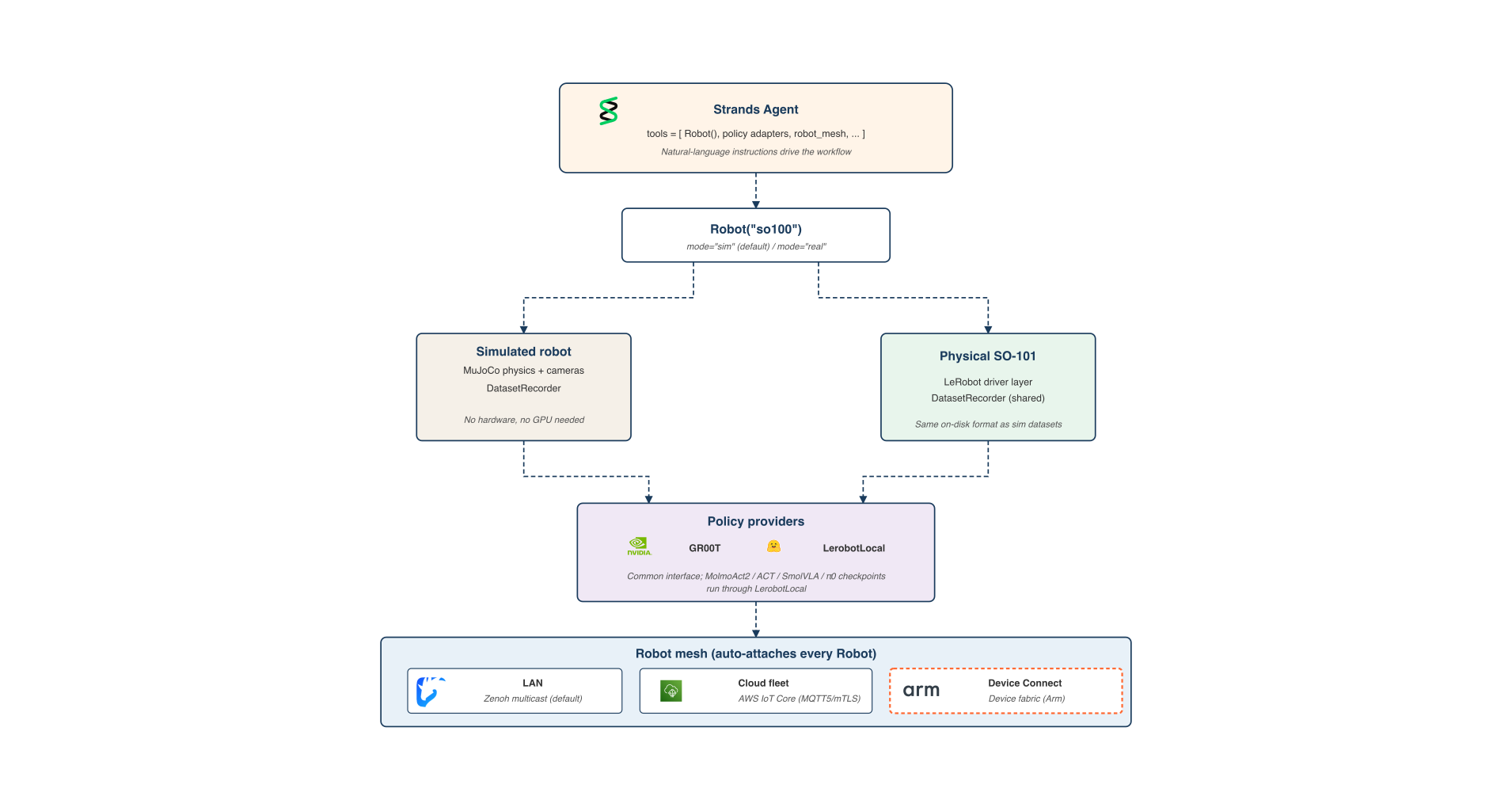
The Strands Robots SDK exposes the LeRobot stack as AgentTools that you compose into one Strands agent. The example agent in this post does four things: record new demonstrations in simulation, push the result to the Hub as a LeRobotDataset, run a policy in simulation against that same format, and deploy the same agent code to a physical robot with one keyword argument change. When you have more than one robot, the agent can coordinate the whole fleet through a built-in peer mesh. For hardware recording and calibration, LeRobot's own CLIs (lerobot-record, lerobot-calibrate) handle the bring-up; the agent picks up from there.
Figure 1. Robot("so100") defaults to a MuJoCo-backed simulation; mode="real" returns a hardware robot driven by LeRobot. Both modes share the same DatasetRecorder and the same policy providers, so a dataset captured in sim and a dataset captured on hardware use the same on-disk LeRobotDataset format.
Two design choices make this work. First, Robot("so100") returns a simulation by default (no hardware, no risk), and mode="real" returns a hardware-backed robot driven by LeRobot. The agent code is identical across both modes. Second, the DatasetRecorder that writes a LeRobotDataset is shared between the simulation path and LeRobot's own hardware recording, so a dataset captured in MuJoCo and one captured from a physical SO-101 are in the same format.