Original article excerpt
Server-side extracted preview paragraphs from the original source.
This post shows how to enable Adobe Marketing Agent for Amazon Quick using a Model Context Protocol (MCP). We walk you through how to configure the integration, authenticate using your Adobe credentials, and get the latest insights in Amazon Quick. The sample workflow returns audience rankings, loyalty segment summaries, journey usage, and conflict recommendations.
Amazon Quick and Adobe Marketing Agent help marketing teams access campaign insights within governed conversations in seconds. Marketers can ask questions about campaign performance, audiences, journeys, campaign conflicts, and content performance in natural language. Amazon Quick provides the chat experience and action orchestration. Adobe provides marketing-domain analysis to the approved data sources behind those questions.
This post shows how to enable Adobe Marketing Agent for Amazon Quick using a Model Context Protocol (MCP). We walk you through how to configure the integration, authenticate using your Adobe credentials, and get the latest insights in Amazon Quick. The sample workflow returns audience rankings, loyalty segment summaries, journey usage, and conflict recommendations.
Amazon Quick integrations connect external applications and services to AI-powered analysis and automation. With MCP integrations, Amazon Quick connects to remote MCP servers, discovers exposed tools, and registers selected tools as actions. An assistant can call those actions during a conversation. In this solution, the Adobe Marketing Agent exposes marketing tools. The tools cover audience ranking, loyalty analysis, journey lookup, conflict analysis, and content performance summaries.
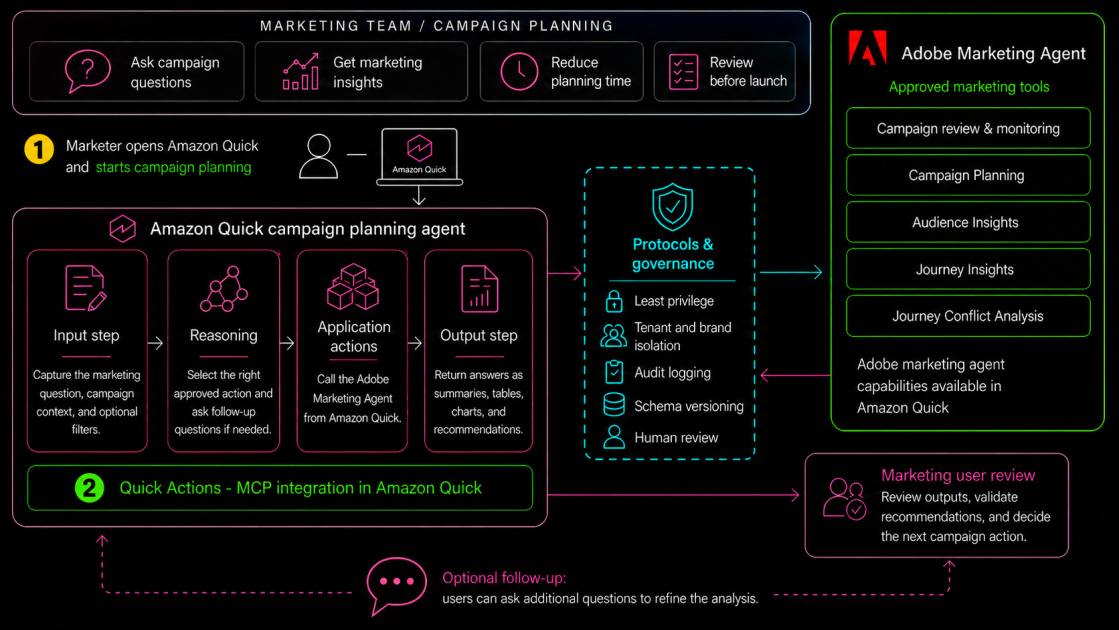
The following architecture shows the end-to-end request flow. A marketer asks a campaign planning question in Amazon Quick. The chat agent selects an approved action from the Adobe Marketing Agent integration. The MCP server validates the request and queries authorized Adobe marketing data. Amazon Quick renders the response as an answer, table, chart, or recommendation. Apply governance controls across the flow, including least privilege, tenant isolation, audit logging, schema versioning, and human review for launch decisions.
Figure 1. Architecture for connecting Adobe Marketing Agent to Amazon Quick using MCP.
Before you configure the Adobe Marketing Agent integration, you must complete the following prerequisites.