Original article excerpt
Server-side extracted preview paragraphs from the original source.
In this post, you will learn how to build an end-to-end integration between Snowflake semantic views and Amazon Quick. The sample data is user review data for a media company. You start by loading movie review data from Amazon Simple Storage Service (Amazon S3) into Snowflake, define a semantic view in SQL to add business meaning, explore it with natural-language queries through Cortex Analyst, and then generate an Amazon Quick dataset and dashboard. The dataset can be created manually or with a provided automation script. By the end, your BI team or AI team can ask natural-language questions against a governed data layer and trust that every response reflects the same business logic.
One dashboard shows 42,000 active movie view counts while another shows 38,500. Your chat agent references a third number entirely. Data teams spend hours reconciling numbers instead of answering strategic questions, and trust in analytics erodes.
This is a pattern that we see across many organizations. Teams spend more effort reconciling numbers than actually using them, quietly slowing down decision-making and chipping away at confidence in the data.
The root cause is usually a last-mile gap: business logic lives inside each individual application rather than at the data layer where every application can share it.
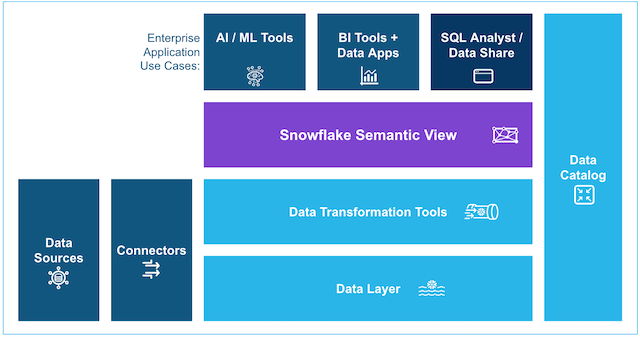
Amazon Quick Sight datasets on top of Snowflake semantic views close that gap. A semantic view is a Snowflake schema object that attaches business definitions (table, relationships, metrics, and dimensions) directly to your data. Any downstream application that queries the semantic view inherits the same definitions, so both AI and BI systems interpret information uniformly. This leads to trustworthy answers and significantly reduces the risk of AI hallucinations.
You can use semantic views in Cortex Analyst and query these views in a SELECT statement. You can also share semantic views in private listings. As native Snowflake schema objects, semantic views have object-level access controls. You can grant or restrict usage and query rights just as with tables and views, supporting authorized, governed usage across SQL, BI, and AI endpoints. You can read more about how to write Semantic SQL in the Snowflake documentation.
In this post, you will learn how to build an end-to-end integration between Snowflake semantic views and Amazon Quick. The sample data is user review data for a media company. You start by loading movie review data from Amazon Simple Storage Service (Amazon S3) into Snowflake, define a semantic view in SQL to add business meaning, explore it with natural-language queries through Cortex Analyst, and then generate an Amazon Quick dataset and dashboard. The dataset can be created manually or with a provided automation script. By the end, your BI team or AI team can ask natural-language questions against a governed data layer and trust that every response reflects the same business logic.